Priority messages on every agreed screen
Use controlled publishing, screen groups, priority content and restore behaviour for approved safety and emergency communications.
Dhruv Education
An all-in-one Dhruv Education proposition for schools, colleges, universities and trusts: built-in Martyn's Law messaging, campus information, IPTV, QR-to-mobile interaction, transport updates and every agreed screen in one controlled system—not an add-on.
Dhruv Education Digital Signage
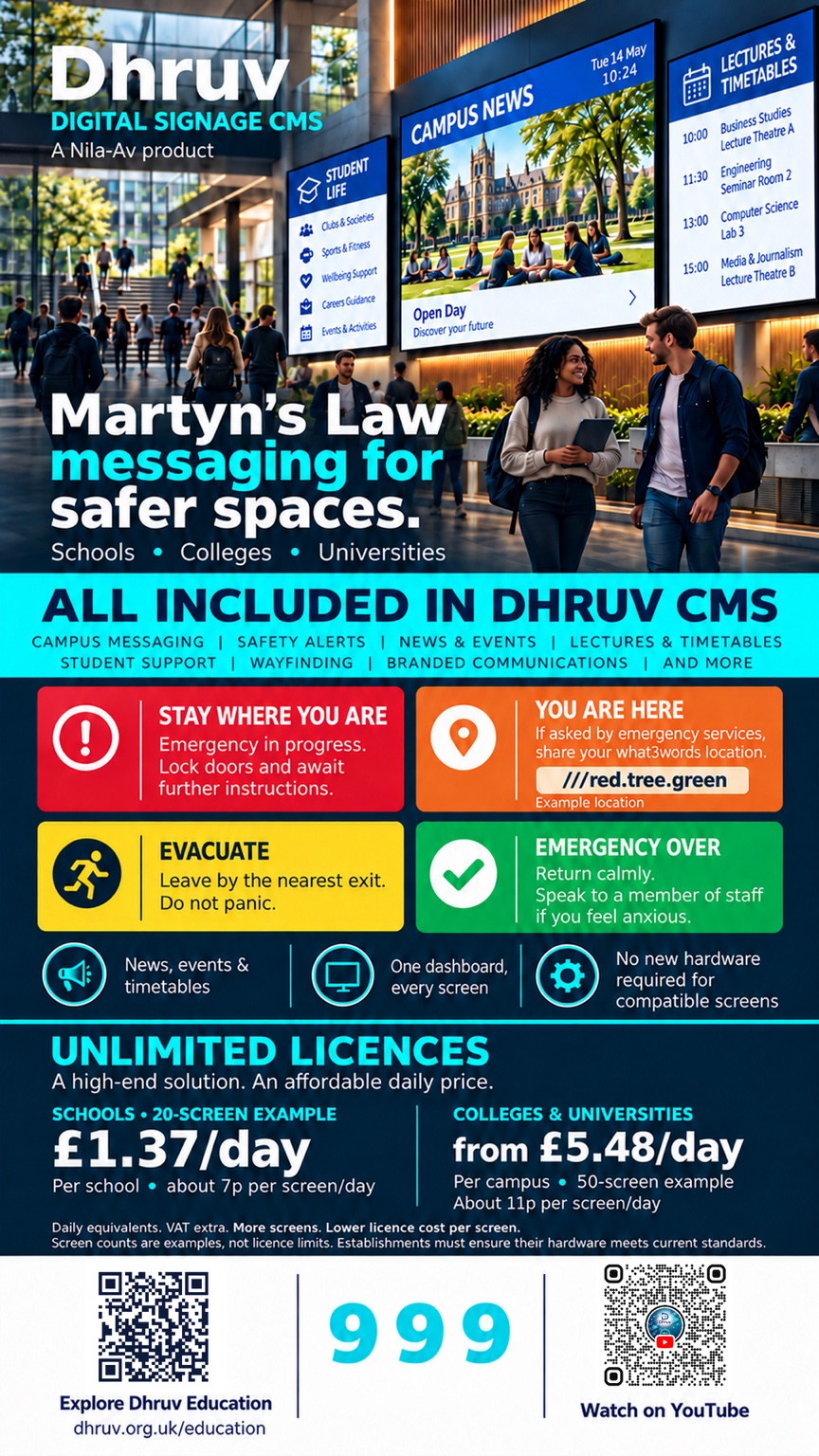
From £5.48 per day for 50 screens
Based on 50 screens: approximately £5.48 per day in total, or £0.11 per screen per day. Hardware, installation and optional room technology are scoped separately.
Priority one · safer spaces
Martyn's Law communication support is built into Dhruv's core Education platform, so an education organisation can prepare, govern and publish priority communications across the agreed screen estate when an approved plan requires it.
Use controlled publishing, screen groups, priority content and restore behaviour for approved safety and emergency communications.
Keep messages, permissions, ownership and operational procedures aligned with the institution's own risk assessment and training.
One education proposition
Dhruv Education brings the agreed software capabilities together under one site proposition, with Martyn's Law communication support built into the core Dhruv platform rather than offered as an add-on. Hardware, installation, data-feed access and third-party services remain clearly identified where they are integration-dependent.
Core Dhruv functionality for governed priority messaging, prepared templates and controlled screen targeting for the approved institutional plan—not an add-on.
Announcements, events, timetables, menus, wayfinding, student news and staff communications.
Support the selected IPTV or live-streaming workflow where the source, network, display and endpoint capabilities are confirmed.
Turn compatible screens into entry points for forms, maps, bookings, information and mobile journeys without requiring touch hardware everywhere.
Show live departures and service information when an authorised transport API or feed is available, with agreed refresh and fallback behaviour.
Manage compatible displays across buildings, reception, corridors, classrooms, libraries, dining areas and shared spaces through one controlled platform.
A simpler licence model
Dhruv Education lets an education site expand its agreed signage estate without multiplying per-screen software licence costs as communication needs develop.
Included digital signage scope
Approximately £0.11 per screen per day under the current annual licence model, with daily communication flows designed around the education environment.
Built around your building
Deploy signage in receptions, corridors, classrooms, libraries, dining areas, sports facilities, staff spaces and communal areas without forcing every location into the same hardware or workflow pattern.
Everyday communications
The everyday flow is deliberately simple, while the complete Dhruv workflow keeps the formal Import, Create and Publish stages distinct.
Step 1
Prepare the information staff and students need to see.
Step 2
Select the agreed screen, group, building or destination.
Step 3
Send approved content through the intended operational flow.
Across the education community
Use an agreed screen and publishing flow to make campus communication visible where people actually need it.
Announcements and notices
Events and timetables
Menus and visitor information
Safeguarding and emergency communications
Student, staff and campus news
Wayfinding and promotional content
Hardware and streaming
A SoC-first flow keeps the deployment appropriate to the selected commercial display. Dedicated hardware is included only where the selected application needs an endpoint beyond the screen.
Where the compatible commercial display supports the selected flow, use the intelligence already inside it to reduce additional devices, cabling, power supplies and maintenance points.
Where a selected live-streaming workflow requires dedicated hardware, Dhruv can incorporate an appropriate endpoint such as Amino H200. The approved network, codec, device and service flow are site-specific.
Optional intelligent rooms and spaces
Zeitwart + Qbic can form an optional room-and-space-management layer around classrooms, meeting rooms, study spaces and shared facilities.
Zeitwart + Qbic + Qbic EP700
Surface current availability, bookings and appropriate-space context at the point of use.
Use signage, directions and room information as part of the broader visitor and campus journey.
Use the agreed room and utilisation information to support estate decisions and improved access to facilities.
Education answers
Dhruv Education Digital Signage and optional intelligent-room technology are presented as deliberately separate propositions.
Education today. Brighter tomorrows.
Start with the building’s needs today. Keep the architecture capable of developing tomorrow.
Explore a practical Dhruv Education signage estate or discuss an optional Zeitwart + Qbic room-and-space flow.
Dhruv Education insights
Practical ideas for schools, academies, colleges and universities planning clearer campus information and digital signage operations.
Dhruv Education blog
How welcome messaging, wayfinding, events and daily notices can move through one consistent screen experience.
Read related insightsDhruv Education blog
A campus-first way to decide where information belongs and how teams can keep it current.
Read related insightsEducation resource
Read the full Dhruv Education presentation in the embedded flipbook, then discuss the signage, room and space requirements for the agreed site.
Open the flipbook in a new tab